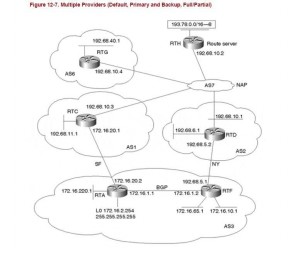
As you can see from the title this is a lab where AS3 is our AS, then there are strong>AS1 and AS2 that are our providers and then some other ASs.
Target of this lab is:
- 1 – having the network 172.16.10.0 and 172.16.65.0 reachable from NY link (path preferred)
- 2 – having the network 172.16.220.0 reachable from the SF link (path preferred)
- 3 – having AS3 not a transit network for AS1 and AS2
- 4 – having AS3 from the SF link that allows only AS1 and directly AS1 attached AS’s routes (AS3 SF link accepts only AS1 and AS7 routes)
1) having the network 172.16.10.0 and 172.16.65.0 reachable from NY link (path preferred)
RTA:
Create an access list that permits the traffic we need 172.16.10.0/24 and 172.16.65.0/24
access-list 1 permit 172.16.10.0 0.0.0.255
access-list 1 permit 172.16.65.0 0.0.0.255
Then create a route-map that matches this traffic and prepends 3 3 3 3 (one 3 of course is enough, I used 4 just for having a better visibility in the show commands).
route-map PREPEND_PATH permit 10
match ip address 1
set as-path prepend 3 3 3 3
route-map PREPEND_PATH permit 20
Then apply the route-map into the BGP router process:
router bgp 3
neighbor 172.16.20.1 route-map PREPEND_PATH out
2: Having the network 172.16.220.0 reachable from the SF link (path preferred)
RTF:
Same story here but creating an access list for the IP:
access-list 1 permit 172.16.220.0 0.0.0.255
3: Having AS3 not a transit network for AS1 and AS2
Quite easy to reach using the regular expressions. We just need to create an ip as-path access list and match it using a route-map:
ip as-path access-list 2 permit ^$
Regular expression ^$ allows only local routes.
Then we can match this rule in the previously created route-map:
route-map PREPEND_PATH permit 20
match as-path 2
We have to do the same in RTF.
4: Having AS3 from the SF link that allows only AS1 and directly AS1 attached AS’s routes (AS3 SF link accepts only AS1 and AS7 routes)
We can reach this target using another regular expression:
ip as-path access-list 1 permit ^1 ?[0-9]*$
and then
route-map ACCEPT_LOCAL permit 10
match as-path 1
and then
router bgp 3
neighbor 172.16.20.1 route-map ACCEPT_LOCAL in
Regular expression ^1 ?[0-9]*$ means:
^1 –> a list of ASs that starts with number 1
? –> means that it can matches zero or one occurrences of the pattern
[0-9] –> designates a range of single-character patterns
* –> matches zero or more sequences of the pattern
$ –> matches the end of the input string
You can easily verify what a reg exp matches using the command show ip bgp regexp ^1 ?[0-9]*$
Pay attention that ‘?‘ is reproducible with a CTRL-V pressed before the question mark.
I would omit the show command results. Target are well described. If you are doing this lab and you need info don’t hesitate to leave a comment.
Net file for GNS3: Multiple_Providers-Default_Primary_and_Backup_FullPartial
Config files:
RTA – RTF – RTD – RTC – RTH – RTG